Introduction
Installing a CCTV system is one of the most effective ways to improve security for homes, offices, retail stores, warehouses, and commercial properties. Modern surveillance technology offers advanced features such as high-definition recording, remote monitoring, motion detection, night vision, and intelligent video analytics. However, choosing the right equipment requires careful planning, as purchasing the wrong system can lead to unnecessary expenses, poor video quality, and security gaps.
Many property owners make purchasing decisions based solely on price or marketing claims without considering their actual security requirements. As a result, they may end up with cameras that cannot capture clear footage at night, insufficient storage capacity, unreliable connectivity, or equipment that cannot be expanded in the future.
Understanding the mistakes to avoid when buying a CCTV system can help homeowners and businesses make informed decisions and invest in a surveillance solution that provides long-term value.
Whether you are purchasing your first security camera system or upgrading an existing installation, knowing what to look for before making a purchase can save time, money, and frustration.
In this guide, we will explore seven common purchasing mistakes, explain why they matter, and provide practical recommendations to help you select a reliable CCTV system for your property.
1. Choosing a CCTV System Based Only on Price
One of the most common purchasing mistakes is selecting a CCTV system simply because it is inexpensive. While staying within budget is important, the cheapest option is not always the most economical choice in the long run.
Low-cost surveillance equipment may have limitations in image quality, recording reliability, durability, and technical support. Some budget cameras also lack essential features such as effective night vision, weather resistance, and reliable motion detection.
For example, a low-resolution camera installed at a building entrance may capture general movement but fail to provide sufficient detail for identifying a person’s face. Similarly, an inexpensive outdoor camera without adequate environmental protection may deteriorate quickly when exposed to rain, dust, or extreme temperatures.
Why Does Quality Matter?
A CCTV system is a long-term security investment. Poor-quality equipment can result in:
- Frequent technical problems.
- Blurry or incomplete recordings.
- Higher maintenance and replacement costs.
- Limited recording capabilities.
- Unreliable performance during critical incidents.
- Difficulty obtaining technical support.
Instead of comparing products only by their initial purchase price, evaluate their overall value.
Consider the camera’s resolution, sensor quality, recording features, warranty, compatibility, and expected lifespan. A slightly more expensive system with dependable performance may provide better value over several years.
What Should You Do Instead?
Establish a realistic budget before shopping and divide it into essential components, including cameras, recording equipment, storage, cables, installation, and maintenance.
Request quotations from multiple suppliers and compare their specifications rather than simply choosing the lowest offer.
A professional installer can also help identify areas where you can reduce costs without compromising essential security requirements.
Remember: The objective is not to purchase the cheapest CCTV system but to find equipment that meets your security needs at a reasonable total cost.
2. Ignoring Camera Resolution and Image Quality
Another major mistake is overlooking camera resolution and assuming that all HD security cameras deliver similar results.
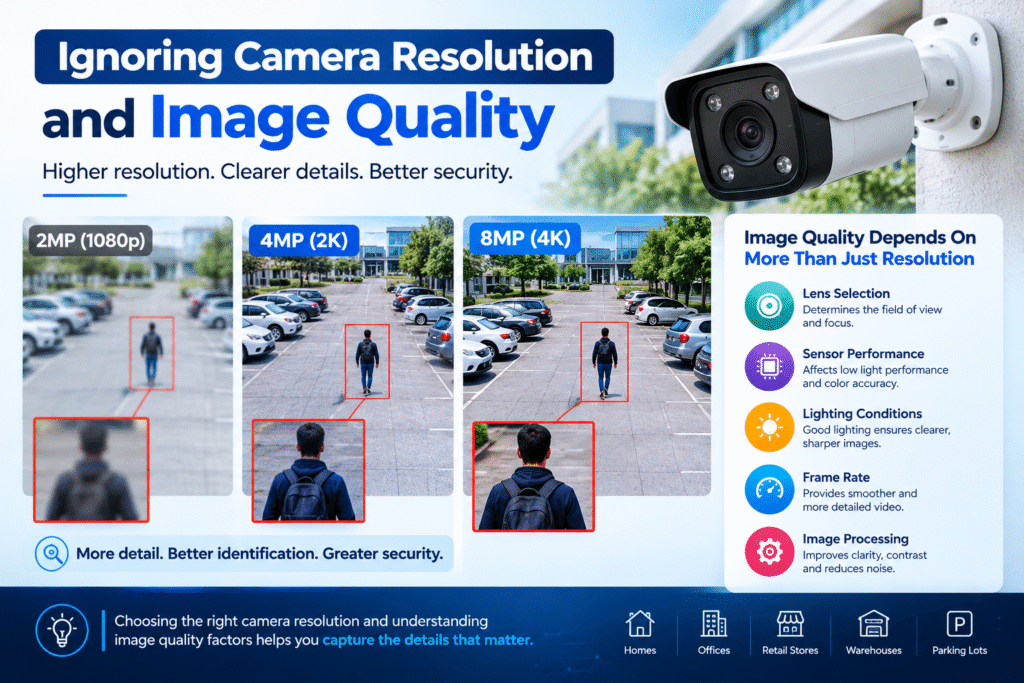
Resolution determines how much visual detail a camera can capture. A camera with insufficient resolution may provide a general overview of an area but struggle to capture identifying details, especially when objects are far away.
For example, a camera monitoring a large parking lot may need higher resolution than a camera covering a small indoor office entrance.
However, resolution is not the only factor affecting image quality. Lens selection, sensor performance, lighting conditions, frame rate, and image processing also influence the final result.
Understanding Different CCTV Resolutions
Common surveillance camera resolutions include:
- 2MP (1080p): Suitable for general monitoring of smaller areas.
- 4MP: Provides additional detail for entrances, corridors, and retail environments.
- 5MP: Offers higher image detail for selected indoor and outdoor applications.
- 8MP (4K): Useful for larger areas where detailed footage is important.
The correct resolution depends on the distance between the camera and the subject, the required level of detail, and available storage and network capacity.
Higher resolution cameras also generate more data, which can increase bandwidth requirements and storage costs.
For technical guidance on camera selection, explore the Axis Communications Product Selector, which provides information about camera types, resolution options, and other surveillance specifications.
How to Avoid This Mistake
Before purchasing, identify the purpose of each camera.
Ask yourself:
- Do I need to monitor general movement or identify individuals?
- How far away will the subject be?
- Will the camera cover a narrow entrance or a wide outdoor area?
- Is the lighting sufficient for clear recording?
- Will the selected resolution work with my recording equipment?
Testing sample footage before installation can also help you understand how the camera performs in real-world conditions.
Choosing the appropriate resolution ensures that your CCTV system captures useful evidence rather than simply producing video recordings.
3. Overlooking Night Vision and Low-Light Performance
A surveillance system must provide dependable monitoring during both daytime and nighttime. Unfortunately, many buyers focus heavily on daytime image quality while overlooking how cameras perform in low-light environments.
This can create serious security gaps, particularly around building entrances, parking areas, warehouses, and outdoor perimeters.
A camera may produce sharp images in daylight but deliver grainy, dark, or unclear footage after sunset.
Why Night Vision Is Important
Many security incidents occur during periods of reduced visibility. Without suitable nighttime performance, a CCTV system may fail to capture important details when they are most needed.
Modern surveillance cameras offer several technologies to improve low-light recording, including:
Infrared (IR) Night Vision: Uses infrared illumination to capture images in darkness, typically producing black-and-white footage.
Full-Color Night Vision: Uses advanced sensors and available light to produce color images in low-light conditions. Some cameras also use built-in white lights to improve visibility.
Wide Dynamic Range (WDR): Helps balance scenes containing very bright and very dark areas, such as entrances with strong sunlight behind a person.
Low-Light Image Sensors: Improve image capture when lighting conditions are limited.
The most suitable technology depends on the environment and the level of detail required.
For further information about selecting cameras for challenging lighting conditions, visit Axis Communications’ guide to infrared surveillance cameras.
How to Avoid This Mistake
Always review nighttime sample footage before purchasing a camera.
Check whether the camera can clearly capture faces, movement, and important objects in the actual lighting conditions of your property.
For outdoor installations, consider nearby streetlights, reflective surfaces, vehicle headlights, and potential obstructions.
Do not rely entirely on advertised night vision distances. The ability to illuminate an area does not necessarily guarantee that a camera can identify a person at the maximum stated distance.
A properly selected camera should provide usable footage throughout the hours when your property requires protection.
4. Buying a CCTV System Without Planning Camera Placement
Even high-quality surveillance cameras cannot provide effective security if they are installed in the wrong locations.
Poor camera placement is one of the most overlooked mistakes to avoid when buying a CCTV system, because many buyers select their equipment before evaluating the property’s layout.
A camera positioned too high, facing direct sunlight, or pointing toward an unnecessary area may fail to capture the information needed during an incident.
Similarly, installing cameras without considering blind spots can leave important sections of a property unmonitored.
Common Camera Placement Problems
Some frequent installation issues include:
- Cameras pointing toward bright light sources.
- Poor coverage of entrances and exits.
- Blind spots near corners and boundaries.
- Cameras installed too high to capture identifying details.
- Obstructions caused by trees, walls, or furniture.
- Overlapping camera views that waste equipment and budget.
- Outdoor cameras exposed to unnecessary environmental risks.
For example, a camera installed above a doorway may capture the top of a person’s head rather than their face if its angle is too steep.
Likewise, a camera covering a large parking area may not provide enough detail to identify vehicles or individuals at a distance.
How to Plan Camera Placement Correctly
Start by creating a basic floor plan or site map.
Identify the areas that require monitoring, including:
- Main entrances and exits.
- Parking areas.
- Reception desks.
- Cash handling locations.
- Warehouses and storage rooms.
- Perimeter boundaries.
- Hallways and access points.
- Areas containing valuable equipment.
Next, determine the appropriate camera type and viewing angle for each location.
Bullet cameras may be suitable for visible outdoor monitoring, while dome cameras are often used in offices, shops, and indoor environments.
PTZ cameras can provide adjustable viewing angles and optical zoom for selected applications, although they should not automatically replace fixed cameras covering critical areas.
Professional site assessments can help identify blind spots and determine the correct number of cameras before purchasing equipment.
Practical Tip: Plan the surveillance coverage first and select the cameras second. This approach reduces unnecessary spending and improves overall security.
5. Underestimating Storage Capacity and Recording Requirements
A CCTV camera is only useful when its footage is recorded properly and remains available when needed.
Many buyers focus on the cameras themselves but overlook the importance of recording equipment and storage capacity.
This can result in systems that overwrite important footage too quickly or fail to record continuously.
For example, a business may expect to retain recordings for 30 days but discover that its storage capacity only supports a much shorter period.
What Determines CCTV Storage Requirements?
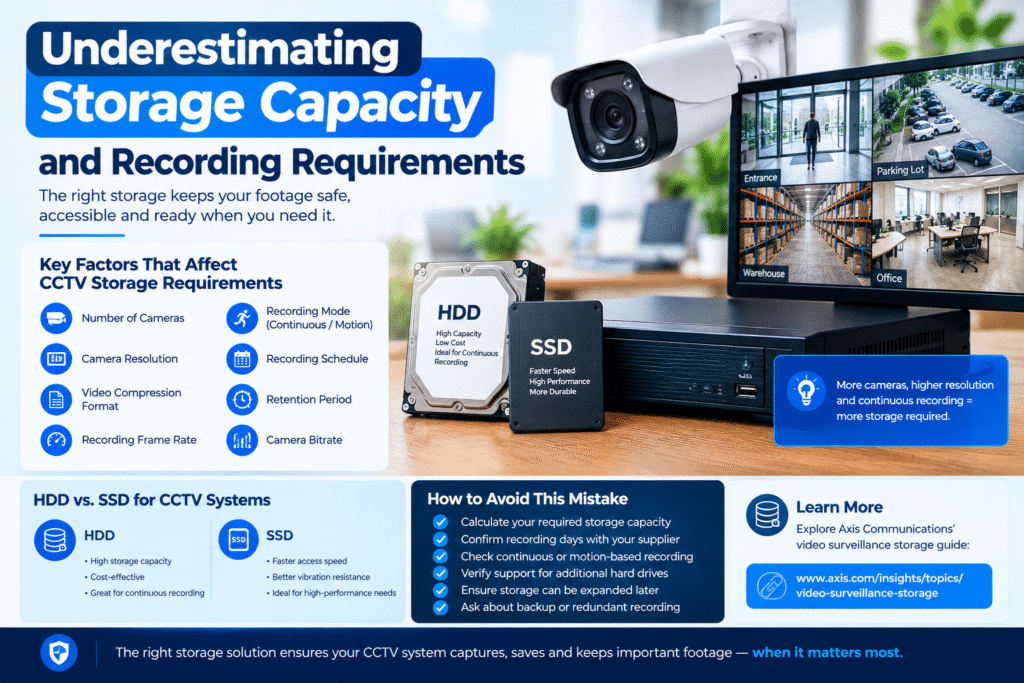
Storage capacity depends on several factors:
- Number of cameras.
- Camera resolution.
- Video compression format.
- Recording frame rate.
- Continuous or motion-based recording.
- Recording schedule.
- Required retention period.
- Camera bitrate.
A system with several high-resolution cameras recording continuously will generally require more storage than a small system using motion-triggered recording.
The type of hard drive also matters. Surveillance systems are designed for continuous recording workloads, so selecting suitable storage hardware is essential for reliability.
HDD vs. SSD for CCTV Systems
Hard Disk Drives (HDDs): Commonly used in surveillance recorders because they offer high capacity at a relatively low cost per terabyte.
Solid-State Drives (SSDs): Offer faster access speeds and can be useful in applications where performance, vibration resistance, or specialized storage requirements are important.
For many traditional CCTV installations, surveillance-rated HDDs are a practical choice for continuous recording.
How to Avoid This Mistake
Before purchasing, calculate how much footage your system needs to retain.
Ask your supplier to confirm:
- The number of days of recording supported.
- Whether the system records continuously or only during motion.
- Whether the recorder supports additional hard drives.
- Whether storage can be expanded later.
- Whether backup or redundant recording is available.
You can learn more about surveillance storage technologies through Axis Communications’ video surveillance storage guide.
It is also important to test playback and recording functionality after installation. A system that displays live video but fails to save recordings does not provide complete surveillance protection.
6. Ignoring Cybersecurity and Remote Access Protection
Modern CCTV systems increasingly connect to the internet, allowing users to monitor their properties through smartphones, computers, and remote management platforms.
Although remote access improves convenience, it also introduces cybersecurity considerations that many buyers overlook.
An improperly secured surveillance system may expose camera feeds, recordings, and connected network devices to unauthorized access.
Weak passwords, outdated firmware, unsecured network connections, and unnecessary open ports can increase security risks.
Common CCTV Cybersecurity Mistakes
Some frequent issues include:
- Keeping default camera passwords.
- Using the same password across multiple devices.
- Ignoring firmware updates.
- Sharing administrator credentials with too many people.
- Using insecure remote access configurations.
- Purchasing equipment without a clear update policy.
- Failing to restrict access to recordings.
These problems can affect both residential and commercial installations.
For businesses, unauthorized access to surveillance footage may also create privacy, operational, and reputational concerns.
How to Protect Your CCTV System
Choose equipment from manufacturers that provide regular security updates and clear technical documentation.
After installation:
- Change all default usernames and passwords.
- Create strong, unique credentials.
- Enable two-factor authentication where supported.
- Update firmware regularly.
- Restrict access according to user responsibilities.
- Use secure remote access methods.
- Disable unnecessary services and network ports.
- Review user permissions periodically.
For additional guidance on securing connected devices, consult the Cybersecurity and Infrastructure Security Agency (CISA), which provides practical recommendations for improving digital security.
Remote monitoring should make your property more secure, not introduce avoidable vulnerabilities.
Before purchasing, ask your supplier how the system handles user authentication, software updates, encryption, and remote connections.
7. Failing to Check Compatibility, Warranty, and Technical Support
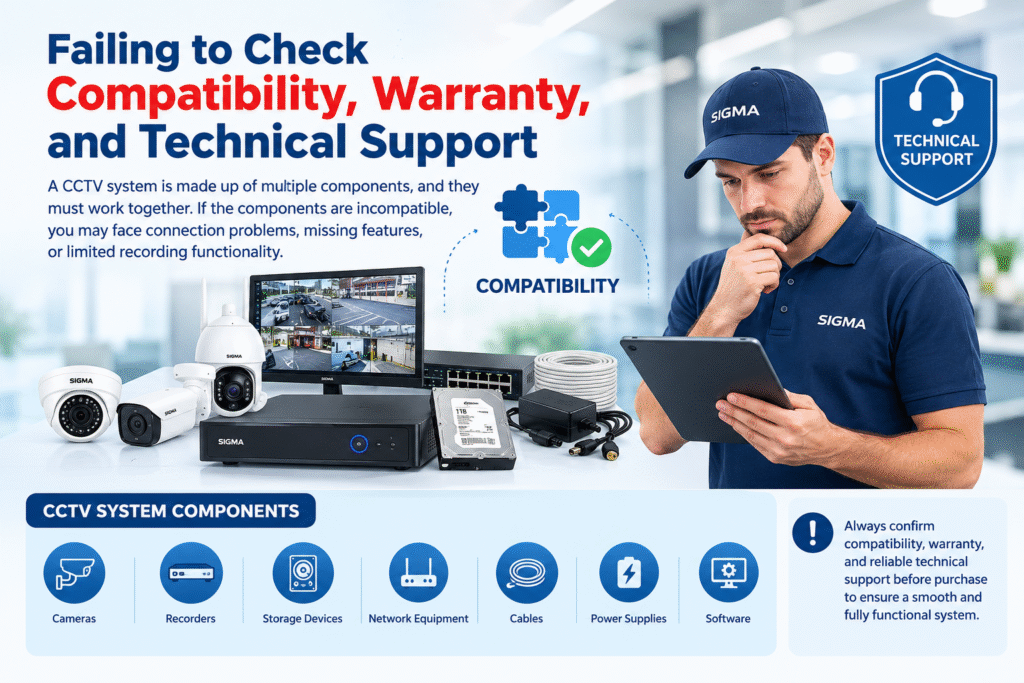
The final major mistake is purchasing CCTV equipment without confirming whether all components work together or whether reliable support is available after installation.
A surveillance system is made up of multiple components, including cameras, recorders, storage devices, network equipment, cables, power supplies, and software.
If these components are incompatible, the system may experience connection problems, missing features, or limited recording functionality.
For example, an IP camera may support advanced analytics, but a particular recorder or software platform might not support those features.
Similarly, a camera may connect successfully while offering only limited functionality through third-party equipment.
Why Compatibility Matters
Before purchasing, verify:
- Camera and recorder compatibility.
- Supported video compression formats.
- Network and power requirements.
- Software compatibility.
- Available recording channels.
- Storage expansion options.
- Remote viewing capabilities.
- Integration with existing equipment.
For IP surveillance systems, checking standards such as ONVIF can help determine whether products from different manufacturers support interoperability. However, compatibility should still be confirmed for the specific features you intend to use.
Warranty and After-Sales Support
A reliable supplier should provide clear information about warranty coverage, repair procedures, replacement policies, and technical assistance.
Ask the following questions before making a purchase:
- How long is the product warranty?
- Does the warranty cover installation-related issues?
- Is technical support available locally?
- Are replacement parts available?
- Can the system be expanded in the future?
- Will the supplier provide maintenance services?
- Is training available for system operators?
A lower-priced product may become expensive if replacement parts are difficult to obtain or technical support is unavailable.
For additional purchasing considerations, read Axis Communications’ guide to selecting a recording solution, which discusses recorder selection, support, reliability, and storage-related decisions.
Choosing a supplier with dependable after-sales service can make a significant difference in the long-term performance of your surveillance investment.
Additional Tips for Making the Right CCTV Purchasing Decision
Avoiding the seven major mistakes is an excellent starting point, but a few additional considerations can help you make an even more informed decision.
Define Your Security Objectives
Before comparing products, identify exactly what you want your CCTV system to accomplish.
A homeowner may prioritize monitoring entrances and outdoor areas, while a warehouse operator may require continuous recording, perimeter protection, and centralized monitoring.
Clearly defined objectives help prevent unnecessary purchases and ensure that the selected equipment meets actual operational requirements.
Consider Future Expansion
Your security needs may change as your property grows.
Choose a system that allows additional cameras, storage devices, and monitoring stations to be added without requiring a complete replacement.
Expandable systems can provide better long-term flexibility for businesses planning to increase their surveillance coverage.
Evaluate Total Cost of Ownership
The initial purchase price is only one part of the overall investment.
Consider installation, electricity consumption, storage replacement, maintenance, software subscriptions, and potential upgrades.
A complete cost assessment helps you compare different systems more accurately and avoid unexpected expenses.
Request a Demonstration
Whenever possible, ask the supplier to demonstrate the system before purchasing.
Test the live viewing interface, playback controls, mobile application, motion detection, and nighttime image quality.
A demonstration can reveal usability issues that may not be obvious from a product specification sheet.
Work With Experienced Installers
Professional installation can improve camera positioning, cable management, network configuration, and recording reliability.
An experienced technician can also identify environmental challenges and recommend equipment suitable for the specific site.
For larger properties or commercial environments, a professional security assessment is particularly valuable.
CCTV Buying Checklist: What to Verify Before Purchasing
Use this checklist to review your options before making a final decision.
Pre-Purchase CCTV Checklist
Your progress
0 of 12 completedDefine the security objectives and coverage areasSelect suitable camera resolution and lens typeVerify night vision and low-light performancePlan camera positions and eliminate blind spotsCalculate recording storage and retention requirementsConfirm recorder and camera compatibilityCheck network security and remote access featuresReview warranty and technical supportCompare installation and maintenance costsConfirm future expansion capabilitiesRequest a product demonstrationObtain a detailed quotation from the supplierReset checklist
Conclusion
Purchasing a CCTV system is an important investment in the safety and security of your property. However, selecting the right equipment involves much more than comparing prices or choosing cameras with the highest advertised specifications.
Understanding the mistakes to avoid when buying a CCTV system helps you make better purchasing decisions, reduce unnecessary expenses, and build a surveillance solution that performs reliably over time.
From evaluating image quality and night vision to planning camera placement, calculating storage, securing remote access, and checking compatibility, every decision contributes to the effectiveness of your security installation.
The most suitable CCTV system is one that matches your property’s specific requirements, provides dependable recording, and can adapt to future needs.
Take time to research your options, compare complete specifications, and consult experienced professionals when necessary. With proper planning and informed purchasing decisions, you can invest in a CCTV system that offers reliable monitoring, useful recorded evidence, and greater peace of mind for years to come.